
AI Visibility controls.
Decide how AI engines find, read, and cite your WordPress site.
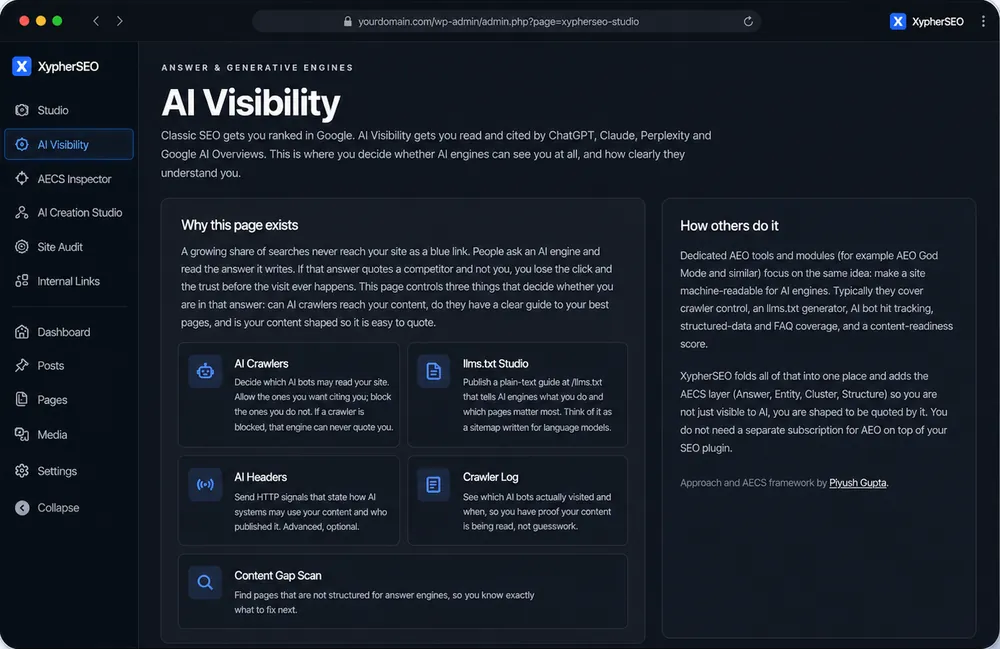
Why this matters
AI crawlers are already on your site. GPTBot, ClaudeBot, PerplexityBot, Google-Extended and others visit WordPress sites constantly, and WordPress gives you no visibility into any of it. You cannot see who came, what they read, or whether they were blocked by accident. XypherSEO makes that traffic visible and puts you in control of it.
What you get
Every capability below is included in the plugin and works inside your WordPress editor.
AI crawler controls
Allow or block GPTBot, ClaudeBot, PerplexityBot, Google-Extended and more, individually, so you decide who is permitted to read your content.
llms.txt Studio
Generate and edit an llms.txt file purpose-built for AI engines, describing what your site does and which pages matter.
AI HTTP headers
Send headers that signal your crawl and usage preferences to AI bots on every page load.
Crawler log
See which AI bots visited, when they came, which pages they read, and what response they got. Real data, not guesswork.
Content gap scan
Find the pages that still need work before they can realistically become AI-visible, ranked by impact.
Robots conflict guard
Catch robots.txt rules that are silently blocking AI access by mistake, which is more common than most site owners realise.
You cannot optimize what you cannot see
Google Analytics does not track bots. Server logs require SSH access and pattern knowledge most people do not have. The result is that AI crawler traffic is invisible on almost every WordPress site. Putting the crawler log inside your dashboard turns an invisible problem into a solvable one.
Common questions
Should I block AI crawlers?
That depends on your goal. If you want AI engines to cite you, you must let them read you. If your content is premium or paywalled, blocking may be right. The point is that it should be a decision you make, not an accident.
Does logging slow my site down?
No. The log records a visit only when an AI bot is detected, and it writes to a dedicated table. Human visitors are unaffected.
What is a robots conflict?
A rule in robots.txt that blocks an AI crawler you actually wanted to allow. It happens often when rules are copied from templates, and it silently makes you invisible to that engine.
Get visible in SERPs and LLMs.
XypherSEO covers SEO, AEO, and GEO in one plugin. Start free, upgrade when you are ready.
See pricing →